.png)
Macworld
A lot of Mac users don’t remember a time before Mac OS X (or macOS, or OS X, depending on the era), but before OS X arrived on the scene, the Mac ran on an entirely different operating system, the classic Mac OS, which was with us from the Mac’s launch in 1984 through the funeral Steve Jobs held for Mac OS 9 in 2002.
The original Mac OS evolved a lot across those 18 years. And perhaps its single most important update, System 7, arrived 35 years ago this month, in May of 1991.
It seems like a footnote now, but so much of what we take for granted on the Mac today was introduced in System 7. Take it from someone who was there–I wanted System 7 so badly, I downloaded a load of floppy disk images across my college computer network so I could install it. And I wasn’t disappointed by what I got. System 7 really did show the way to the future of the Mac.
Seven-year itch
As amazing as the original Mac operating system was, it was largely conceived of in the early 1980s and designed for extremely limited hardware. Even seven years after the first Mac shipped, it had only evolved in some limited ways. By the early 1990s, support for color displays had arrived, though the Mac was hardly what you’d call a colorful interface. Multitasking of a sort arrived, thanks to software called Switcher and later MultiFinder, but it was a severely constrained add-on.
Macs at the time had very little memory, which limited what they could do.
Foundry
And then came System 7.
Let’s start with multitasking. Early Macs had so little memory that it was a miracle they could run one program (plus the Finder), let alone more than one at a time. Some clever hacks let you run more than one app on some Macs with a lot of memory, but it wasn’t until System 7 that the Mac embraced the concept that you could run as many apps as would fit in your Mac’s RAM.
Apple added an Application menu to the menu bar, which indicated the currently open app, the forerunner of the modern macOS menu item that does the same thing. System 7 also introduced virtual memory, which allowed the system to use some disk space to save out memory and also dynamically allocate memory to the programs that really needed it.
I can’t underscore how much of a productivity boost this was. Before multitasking, copying data between multiple apps really was often an exercise of copying, saving, quitting, opening the next app, and pasting. If that seems archaic, let me assure you that you’re also imagining every step of that process happening at least ten times faster than it actually did.
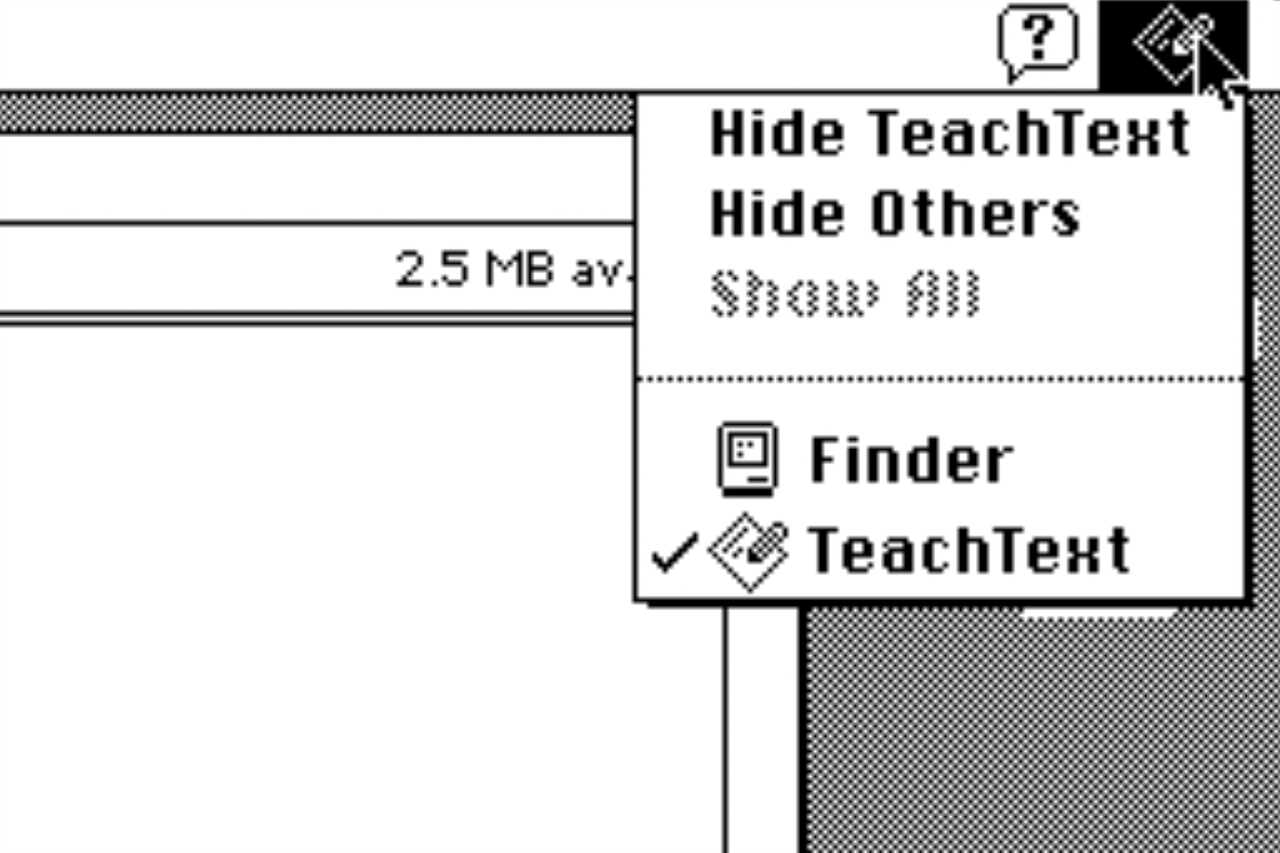
System 7 was the first Mac operating system that supported multitasking. It had an application menu in the upper right corner of the Finder for switching apps.
Foundry
With more programs running, there were also more problems. Now you didn’t need to worry about a bug in one program, but in any of the programs you were running. Fortunately, System 7 also introduced the Force Quit command, activated by pressing Command-Option-Shift-Escape. (Today, we use the more modern Command-Option-Escape.) However, since the Mac wouldn’t get true memory protection until OS X arrived, Apple strongly encouraged you to immediately close all apps and reboot your Mac if you ever had to force quit an app.
Find it in Finder, finally
One of the jokes of the early Mac era was that the one thing the Finder app couldn’t do was find anything. While Spotlight was years away, System 7 did introduce a proper Find command, which let you search for files on your hard drive by name. This was an enormous productivity boost at the time, and charted a course that would eventually lead to Spotlight itself.
To this day, Finder windows in list view display folders with an indicator to the left that, when clicked, rotates and exposes the contents of that folder. That’s another System 7 innovation. We also still have the ability, introduced in System 7, to create an alias of a file in a different location.
In previous versions of Mac OS, copying a file was entirely modal. You had to sit and watch as the files were copied. In System 7, you could switch to other apps and continue to work while the copy concluded. macOS Tahoe introduced the ability to tag individual files with custom colors–or should I say reintroduced, since that feature was also part of System 7.
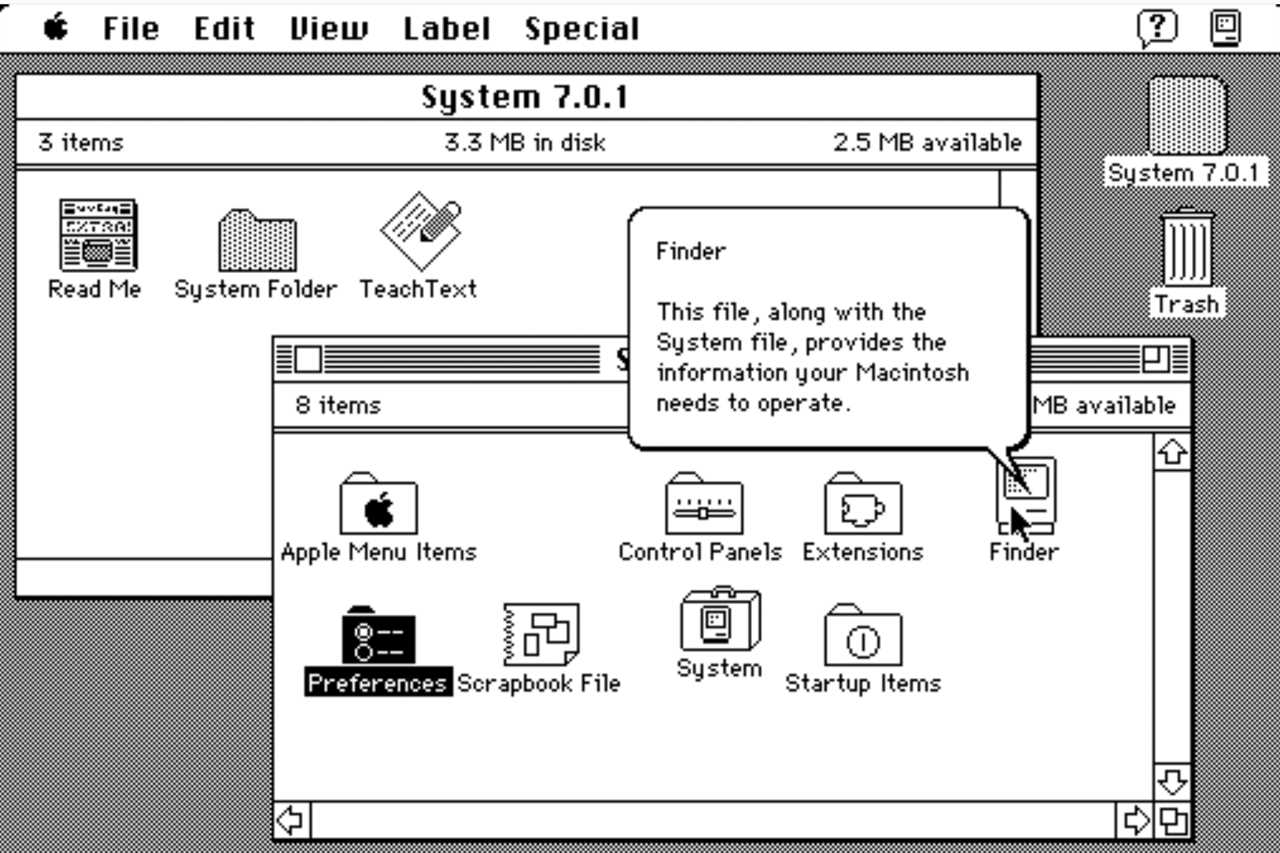
System 7’s Balloon Help could be both helpful and annoying.
Foundry
A trash can that sits there, full of stuff that you can fish out if need be, until you finally choose to empty it? System 7. And how about the ability to share some or all of your hard drive over the network, to other Macs? The fundamental concept of file sharing was also introduced in System 7, bringing an end to a bunch of very weird hacks that let Macs send files to one another over local networks.
AppleScript feels close to retirement these days, and actually didn’t premiere in System 7.0–it arrived a little later, in 7.1.1. But the infrastructure that works to this day to let apps communicate with one another, Apple Events, was introduced in System 7.
Basically, every Mac app has a Help menu at the very end of the menu bar; that was a System 7 innovation, along with a concept called Balloon Help, which was basically floating “tool tips” that could be turned off at a system level.
Finally, here’s a simple bit of Mac body language that so many of us have internalized, but just wasn’t there until 1991: If you drag a file on top of an app icon, that file opens in that app. Yep, something that simple wasn’t a part of the original Mac OS–it was a System 7 innovation.
What we left behind
It’s not all groundbreaking features, of course. A bunch of System 7 stuff died on the vine or gave way to very different ways of approaching computer interfaces in the years to come.
In the early days, the Apple menu was a place for a very specific, regimented set of menu items. Today, it’s similarly locked down. But in the System 7 era, the Apple Menu was literally just the contents of a folder, located inside the System Folder, called Apple Menu Items. You could put pretty much anything in there, and it would be easily accessible from the Apple Menu.
Similarly, the Mac’s original Control Panel was an app full of little tiles that let you do things like adjust the volume. Today’s System Settings app (and its OS X predecessor, System Preferences) is similarly a single app that offers every setting in a series of sub-sections. System 7 went the other way, exploding that original Control Panel into a folder that was full of individual Control Panel items that opened more or less like apps.
System 7 also introduced Extensions, which were the next generation of “INITs,” or software patches that loaded when you booted your Mac and modified the system in some way. I remember being really excited about Extensions, but they added enormous instability to the system. One of the first Extensions was Extensions Manager, which let you choose which Extensions to load in order to help troubleshoot which ones might be crashing your Mac. Eventually, an extremely popular program called Conflict Catcher would help users do the same.
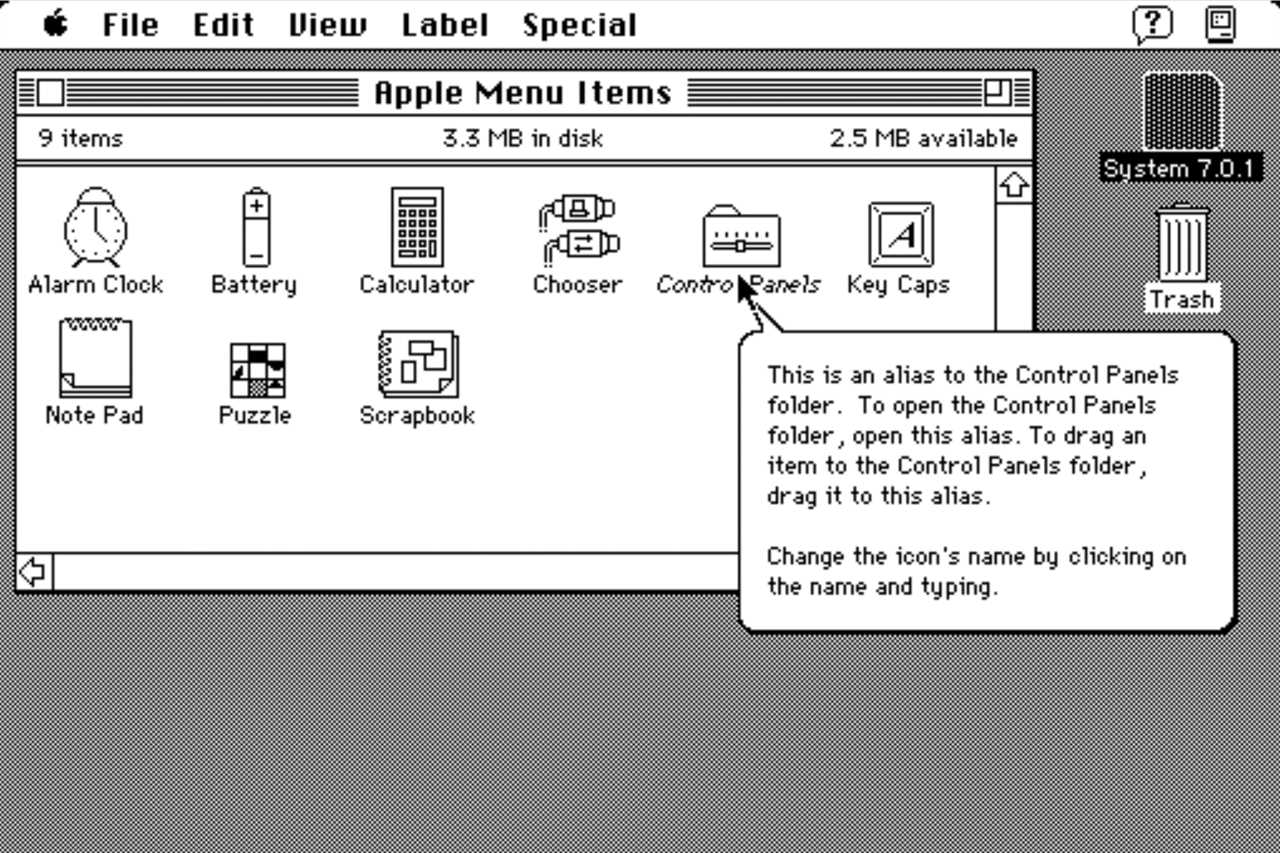
In System 7, the Apple Menu was a folder, and you could customize it by placing items in the folder.
Foundry
Suffice it to say that Apple doesn’t put up with that level of hacking of the system anymore. And for good reason.
End of an era
System 7 was really amazing (web emulators are available for you to try System 7), but it was also a symptom of a growing disease that would plague 1990s Apple. The project was created by a software group nicknamed the Blue Meanies, a reference to the Beatles’ “Yellow Submarine.” They got that name because when Apple engineers were figuring out what features to build for the future of Mac OS, they wrote down more achievable jobs on blue index cards, and long-term goals on pink and red index cards.
The team in charge of implementing the near-term features on the blue cards became the Blue Meanies, and System 7 was the result. The long-term stuff was so far out there that ultimately, the Pink group got spun out of Apple into a next-gen operating system company called Taligent, a joint venture with IBM. It never shipped.
The Yellow stuff included some vital stuff, like protected memory and pre-emptive multitasking, that would eventually become a part of a project called Copland, which was destined to be Mac OS 8 up until the moment when it failed to ship and was literally broken up into parts, some of which shipped, most of which didn’t. The failure of Copland led, eventually, to Apple’s purchase of NeXT, and the arrival of both Steve Jobs and the future Mac OS X at Apple.
So yes, Classic Mac OS was showing its age. But System 7 helped breathe life into it, long enough for it to get to the point where it was worth replacing with something new. 35 years later, it’s clear that Mac users still owe a lot to the Blue Meanies.
Read More
Title: 35 years ago, the Mac got an era-defining upgrade
Sourced From: www.macworld.com/article/3136937/35-years-ago-system-7-era-defining-upgrade.html
Published Date: Wed, 13 May 2026 10:30:00 +0000
Did you miss our previous article...
https://trendinginbusiness.business/technology/the-download-embryo-ethics-and-reducing-chatbot-risks