.png)
Macworld
Apple has been actively marketing the iPhone’s camera capabilities for more than a decade. With every flagship launch, the company boasts about its smartphone’s latest photography and videography features—and even encourages users to share their snaps through the Shot on iPhone campaign.
This year, the iPhone 18 Pro and 18 Pro Max received professional-grade camera upgrades that push their limits further than any other phone. In fact, the software and hardware enhancements unleash unprecedented camera powers on iOS, giving photographers granular control for the first time. If you just bought an iPhone 18 Pro, you’ll want to try these six exclusive camera features right away.
Photographic Styles 3.0
Photographic Styles first launched with the iPhone 13 series as advanced filters of sorts, letting you tweak the tone and warmth of a few preset vibes. With the iPhone 16 line, Apple revamped the feature to include deeper controls, allowing users to extensively adjust the highlights, shadows, hues, and other aspects in real time. The iPhone 18 Pro upgrades the feature yet again.
The third generation of Photographic Styles, which is also coming to the iPhone Duo, maintains its predecessor’s main looks but adds texture controls to the mix. You now get to pick between soft skin, glow, and film textures, along with an optional grain effect. The neat thing about Photographic Styles 3 is that the defaults look great, letting casual users completely transform their photos without spending too much time or effort on editing.
Pros who prefer to fine-tune their shots can dig deeper by adjusting the various sliders included with each option to match the exact vision they have in mind. Like the previous version, Photographic Styles 3 can be added, changed, or removed using the Apple Photos app at any time, preserving your unaltered captures.
To use the new Photography Styles, you’ll beed to snap your photo with an iPhone 18 Pro.
Foundry
Variable aperture
Variable aperture is a standard professional camera feature that allows photographers to control how much external light reaches the sensor. The Phone 18 Pro’s main lens adopts this perk by adding six ultra-thin blades that you can adjust mechanically. A wider aperture lets more light in and helps isolate subjects by adding a bokeh effect to the background. Conversely, a narrower one maintains sharp details across the entire frame, making it ideal for landscape photography or group shots.
The iPhone 18 Pro offers four aperture options: f/1.48, f/1.8, f/2.8, and f/4.0. The first would work well for solo portrait photos or when the lighting is too dim, while the last can produce a prominent starburst effect when directing the camera towards a light source. Coupled with the film texture and grain effect in Photographic Styles 3, you can output some pretty dramatic shots. Users of third-party apps will be able to select any aperture stop within the range.
Of course, you could also opt for the two middle aperture options for something more balanced. If this all sounds too confusing, the auto mode will reliably handle the task and pick the suitable aperture based on your setup.
Pro controls
Beyond the variable aperture, Apple has exclusively unlocked deeper in-app camera controls on the iPhone 18 Pro. Notably, you can now adjust the shutter speed to match your desired result. For example, the fastest mode—which requires proper lighting—can capture individual water droplets in midair as they fall from a faucet. On the other hand, the slowest mode can help sharpen details in the dark if you stay put for one second. You could also use the slow shutter artistically to get motion blur of moving subjects or light sources.
Otherwise, you get to control the white balance now, which essentially changes how cool (blue) or warm (yellow) the temperature is depending on the lighting conditions. A newly added histogram can also help professionals detect overexposure and monitor color channels. Like the aperture, you can continue to use the automatic shutter speed and white balance if you find setting them overwhelming.
To accommodate the evolution, iOS 27 lets users add, rearrange, and remove toggles from the Camera app’s top bar, giving them quick access to their favorite options.
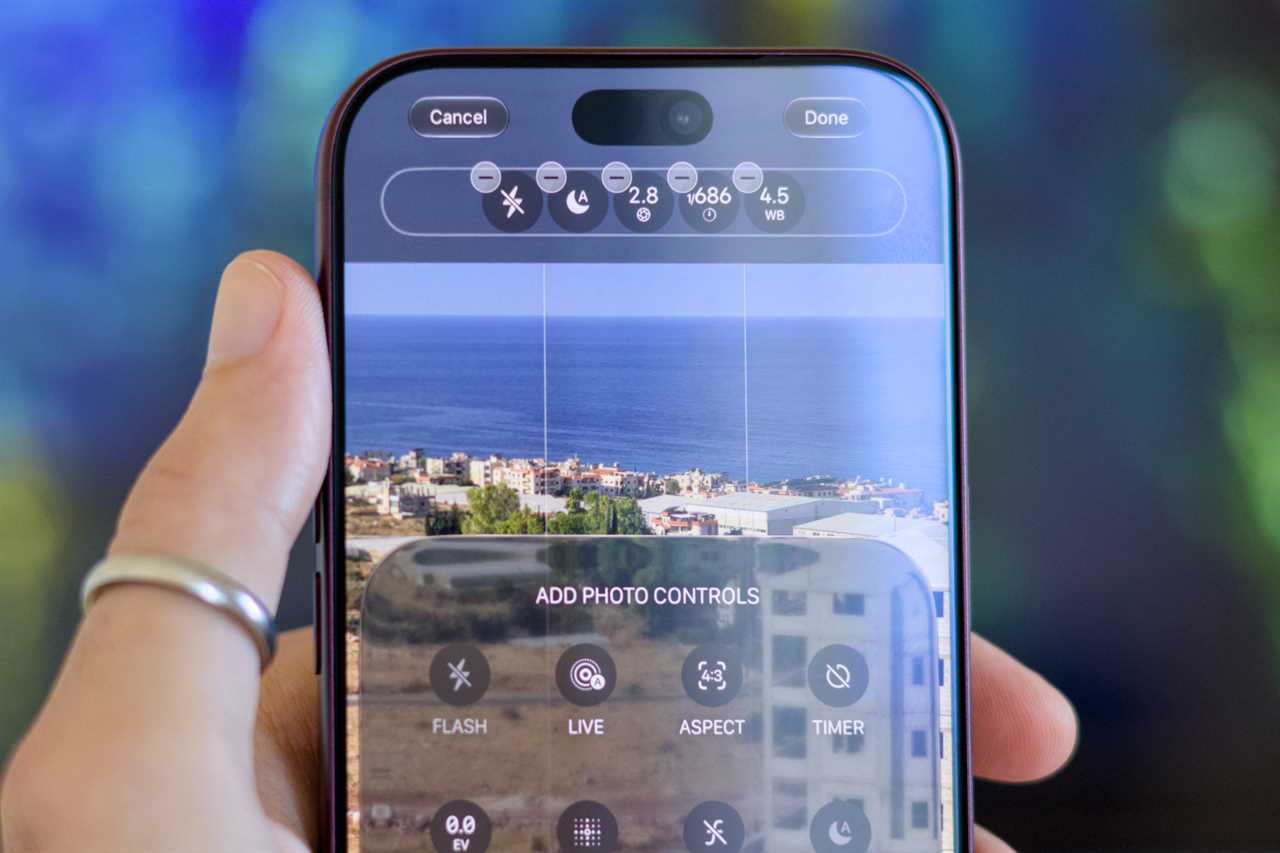
Apple finally has a set of pro controls on the iPhone —but you’ll need an iPhone 18 Pro to get them.
Foundry
Smart focus tracking
Another welcome iPhone 18 Pro camera exclusive is smart focus tracking in both photo and video modes. You can now double-tap on your subject to keep them in focus—regardless of any changes in their position or proximity.
Cinematic video effects
A few years ago, the iPhone 15 lineup introduced the ability to apply Portrait mode effects on subjects captured using the regular photography mode. The feature works by capturing depth data—even when users don’t necessarily opt for Portrait mode. The iPhone 18 Pro brings the same concept to video recording.
iPhones as old as the 13 series can capture footage in Cinematic mode, which adds a blur effect to the background. The feature, however, requires users to specifically select the dedicated mode before they start shooting. With the iPhone 18 Pro, you can apply Cinematic Mode effects on regular videos shot using the main camera. It’s best for fleeting moments, when you couldn’t change to a different mode in time.
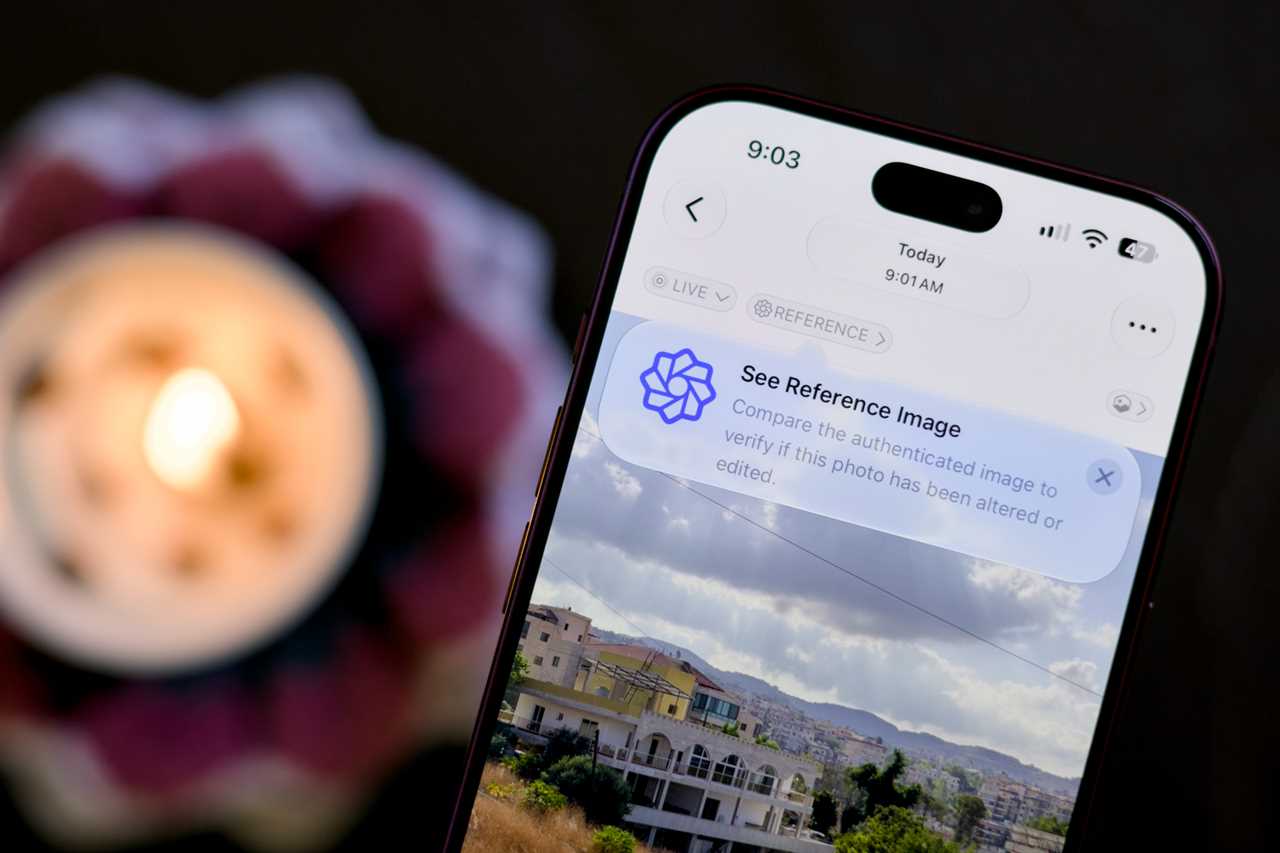
In the age of AI, it’s becoming more important to prove a photo’s authenticity.
Foundry
Reference Image
Finally, the iPhone 18 Pro’s main lens introduces support for Apple Reference Image, a foolproof system that verifies a certain photo’s authenticity. When you enable and shoot using this mode, the sensor signs the photo data on the pixel level and adds a tamper-evident timestamp. Once developed using Apple servers, the reference image acts as a secure digital negative that proves your photo hasn’t been altered. It’s a welcome addition for photojournalists, given the rise of convincing AI-generated content and fake news.
It’s worth noting that Reference Image mode blocks certain features, such as Night mode, and consumes more disk space compared to a regular photo. You may want to avoid using it for casual daily shoots and instead reserve it for capturing extraordinary moments that people might otherwise doubt.
Read More
Title: 6 iPhone 18 Pro photography tricks worth spending more to get
Sourced From: www.macworld.com/article/3253955/6-iphone-18-pro-photography-tricks-worth-spending-a-little-more-to-get.html
Published Date: Fri, 09 Oct 2026 10:45:00 +0000