.png)
Macworld
AI is rapidly being integrated into the hardware and services we depend on, including iPhones, iPads, and Macs. While Apple’s in-house AI models remain relatively limited for now, Apple users have other options: most appealingly, the company has natively baked OpenAI’s popular ChatGPT into its systems. This enables you to easily fetch up-to-date information, polish text, generate images, and much more.
If you’re not already using AI to accelerate your everyday workflows, it’s time to get with the program. Try these 10 ChatGPT features on your Apple devices of choice, and watch your productivity skyrocket.
Applets
OpenAI recently launched ChatGPT apps as a way to access your favorite services using text prompts. The feature is available in the latest ChatGPT app across iOS, iPadOS, macOS, and the web. To get started, you can visit the Apps section in ChatGPT settings and connect the accounts you’re interested in.
For example, the Apple Music applet lets you find songs, generate playlists, and add them to your library right from ChatGPT. Similarly, the Adobe Acrobat offering enables you to upload a PDF document and make certain tweaks using the chatbot’s interface.
As you’d probably expect, the functionality of these apps is somewhat limited. They’re cut-down versions of the full app, a little like Apple’s App Clips, and more advanced workflows will still require the use of the real thing. But they’re solid for performing specific, quick tasks using natural language.
Mahmoud Itani / Foundry
macOS assistance
ChatGPT’s integration with apps isn’t confined to the limited range of applets available on the platform itself. If you’ve installed the official client on your Mac, you’ll be able to link it to active macOS app sessions and ask relevant questions.
Simply tap on the App Store icon in the ChatGPT app’s text box to view a list of compatible, installed apps. If you pick Terminal, for instance, it will read the commands you’re entering and help you type the correct ones to achieve a certain aim. Likewise, it can view the notes you’re typing and suggest edits based on your prompt.
Quick access
Locate the ChatGPT app on your Home Screen can be inefficient when performing time-sensitive tasks. Fortunately, ChatGPT offers a ton of shortcuts to quickly summon it on iOS, iPadOS, and macOS.
On iOS and iPadOS, you can add ChatGPT controls to the Control Center and Lock Screen, letting you quickly initiate a new session from different parts of the system; on newer iPhones, you can also have the Action button launch a ChatGPT instance. On the Mac, you can hit Option and Space to reveal a miniature ChatGPT text box to enter your prompts, connect apps, upload files, and so on. You can also add ChatGPT to shortcuts you create in the Apple Shortcuts app and have it analyze input or fetch requested data.
Siri fallback
Siri often fails to answer basic questions and instead redirects users to web results. If you’ve enabled Apple Intelligence, however, the voice assistant can now tap into ChatGPT’s intellect instead.
To turn this on, open the Settings app, go to Apple Intelligence and Siri > ChatGPT, and enable the Use ChatGPT toggle. (You can also turn off the Confirm Requests option if you’d rather not have Siri ask for your permission every time it needs to share a text prompt with ChatGPT’s servers.) Now, you can command Siri to ask ChatGPT any question, and it’ll read aloud the response it receives.
Writing Tools
This neat text editing suite allows you to natively proofread, rewrite, summarize, and change the tone of selected text. Thanks to ChatGPT, the feature also lets you apply custom edits or generate text from scratch. Just select the text you’d like to edit, then hit Writing Tools, followed by Compose. You can then describe the changes you’d like to make and ChatGPT will handle the rest.
Mahmoud Itani / Foundry
Image Playground
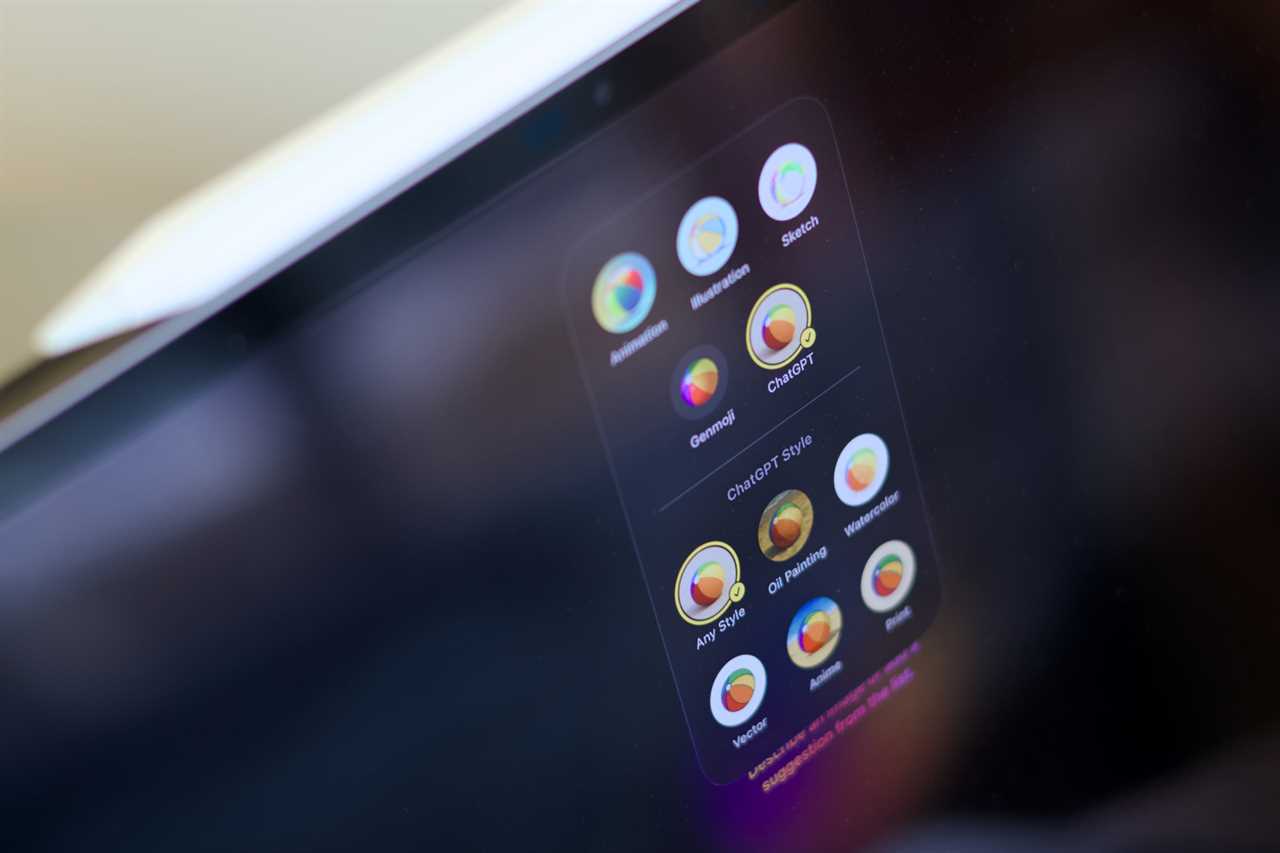
Image Playground is Apple’s own AI image generator, featuring multiple illustration styles, doodle polishing support, offline access, and more. To elevate the quality of outputted images, you can rely on ChatGPT’s superior image generation models without leaving the app.
Click the Styles dropdown menu in the Playground app on iOS, iPadOS, or macOS, then select ChatGPT. You can then pick a more specific style, such as Anime, Vector, or Oil Painting. Now you can type your prompt or add some of the suggested ones and wait for the result to appear.
Paid perks and data sync
Using ChatGPT integration on your Apple devices comes with daily limits that, when exceeded, prevent you from uploading files, generating images, and accessing advanced models. If you’re subscribed to ChatGPT Go, Plus, or Pro, you can link your paid account to extend or remove said limits. In Settings, go to Apple Intelligence & Siri > ChatGPT, and sign in with your OpenAI account. This will also sync the conversations you have with ChatGPT via Siri and show them in your chat history.
Group chats
Lastly, if you’re planning an event or working on a project with others, you can create a group chat in the ChatGPT app. To get started, tap on the dedicated button in the top-right corner of a ChatGPT conversation and share the link with your friends or coworkers. This lets you all brainstorm together and have ChatGPT share its knowledge whenever needed.

Mahmoud Itani / Foundry
Shopping advice
Picking the right model when upgrading your Apple device can be confusing for tech newbies. Obviously, Macworld should be your first stop when seeking iPhone, iPad, or Mac buying advice, but ChatGPT is keen to join the party with its Shopping Research feature.
Select the relevant mode in the ChatGPT app and describe the product you’re looking to buy. ChatGPT will ask follow-up questions related to budget and performance expectations to narrow down your options, then display results comparing the prices, specs, images, and other relevant aspects of the matching devices. You can then choose one of them and buy it through your favorite online retailer.
Understanding your iDevices
ChatGPT can also help tech newbies learn more about their Apple devices and the latest OS features. Again, Macworld has long been happy to help in this regard, but who are we to stand in the way of progress? It’s far better, clearly, to ask a chatbot.
ChatGPT can, for example, check the latest available OS version for your device and briefly list the top features it introduces using simple language. This helps you familiarize yourself with what’s new, without having to read complex changelogs. Similarly, if you encounter errors when using your Apple devices, you can upload screenshots to ChatGPT or use the video calling mode to show it what’s going on in real time. The chatbot will then suggest solutions or workarounds based on similar issues discussed on online forums. Or beloved Apple-focused websites.
Read More
Title: ChatGPT is your iPhone’s secret superpower
Sourced From: www.macworld.com/article/3026151/chatgpt-is-your-iphones-secret-superpower.html
Published Date: Thu, 19 Feb 2026 12:15:00 +0000
Did you miss our previous article...
https://trendinginbusiness.business/technology/how-uncrewed-narco-subs-could-transform-the-colombian-drug-trade